BleachBit Introduces Text-Based Interface: A Hands-On Look at the Alpha TUI
What Is BleachBit and Why a Text Interface?
System cleanup utilities are a matter of personal preference, but on Linux, tools like BleachBit have earned a loyal following. This free and open-source application handles a wide range of cleaning tasks—from purging browser caches and old package archives to securely shredding files and wiping free space. Originally available as a graphical application (GUI) and a command-line interface (CLI), BleachBit now offers a text-based user interface (TUI) in alpha stage. Developers released an early preview, allowing users to experience a keyboard-driven, terminal-friendly alternative that retains all the core functionality of the GUI.
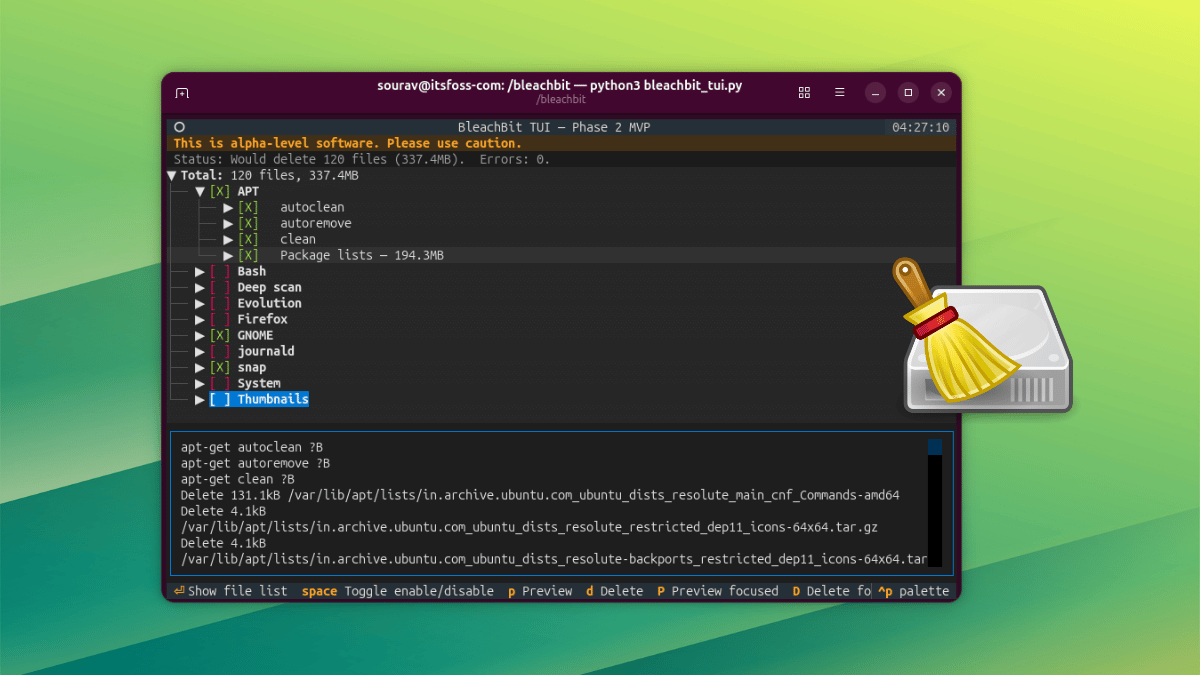
Navigating the BleachBit TUI
The TUI is designed to be straightforward and efficient. Below we break down the main controls and features.
Keyboard Controls and Navigation
- Space bar: Toggle cleaning options on or off.
- Enter: Expand a category to display the underlying list of files.
- p (lowercase): Run a full preview of all selected items.
- P (uppercase): Preview only the currently focused component. Use Shift or Caps Lock for uppercase input.
- d (lowercase): Delete all selected items.
- D (uppercase): Delete just the focused component.
During testing, the deletion command initially failed because the TUI was launched without elevated privileges. Re-running with sudo python3 bleachbit_tui.py resolved the issue. After initiating deletion, a confirmation prompt requires pressing Y. Once completed, a dialog in the bottom-right corner displays the number of deleted files and recovered space.
Palette Menu and Additional Features
Press Ctrl+P to open the palette menu. From there you can:
- Search commands
- Maximize a selected component
- Quit BleachBit
- Save a screenshot
- Access the help side panel with shortcuts
The TUI also supports display themes, mouse interaction (including scroll wheel), and keyboard navigation simultaneously.

Under the Hood: Shared Backend and Settings
Because the TUI shares the same backend as the regular BleachBit GUI, all your existing settings carry over automatically. This includes:
- Selected cleaning options
- Keep list (files to preserve)
- Custom cleaning list
- Cookie keep list
This seamless integration means you can switch between GUI and TUI without reconfiguring preferences.
Platform Availability and How to Test
BleachBit’s TUI is currently available on both Linux and Windows. On Windows, it ships as a 64-bit native binary in both installer and portable forms—unlike the 32-bit stable GUI and CLI builds. For Linux users, the official announcement provides quick-start instructions for running the TUI on Ubuntu. Alternatively, you can build from source.
Important: Alpha Stage
This is an early development release. Expect bugs, incomplete features, and potential breakage. The developers encourage testing but advise caution when cleaning important system files.
Conclusion
BleachBit’s new TUI offers a compelling option for users who prefer terminal-driven workflows or need to run cleanup tasks on headless servers. By leveraging the same backend as the GUI, it maintains consistency while introducing a clean, keyboard-centric interface. As the project matures, the TUI could become a standard part of the BleachBit suite, providing an accessible middle ground between quick CLI scripts and heavy graphical applications.
Related Articles
- Breaking: Paramount+ Unleashes Three Disturbing True-Crime Documentaries for May 1-3 Weekend Stream
- How to Install and Use Fonttrio Font Pairings in Your shadcn/ui Project
- 10 Crucial Insights into NVIDIA and SAP's Trust-Driven AI Agent Collaboration
- Harnessing AI for Accessible Image Descriptions: A Practical Guide
- AI Accessibility Gains Momentum Despite Skepticism: Microsoft Expert Sees 'Yes, And' Opportunity
- Securing the Invisible: How Arcjet Guards Protects AI Agents Beyond HTTP Boundaries
- Volcanic Forecasting Breakthrough: Scientists Race to Predict Eruptions Like Weather
- Enhance Terminal-Based Observability with the gcx CLI: Bridging Agents and Production Insights