gThumb 4.0 Alpha: A Radical Visual Overhaul with GTK4 and Libadwaita
A New Era for gThumb
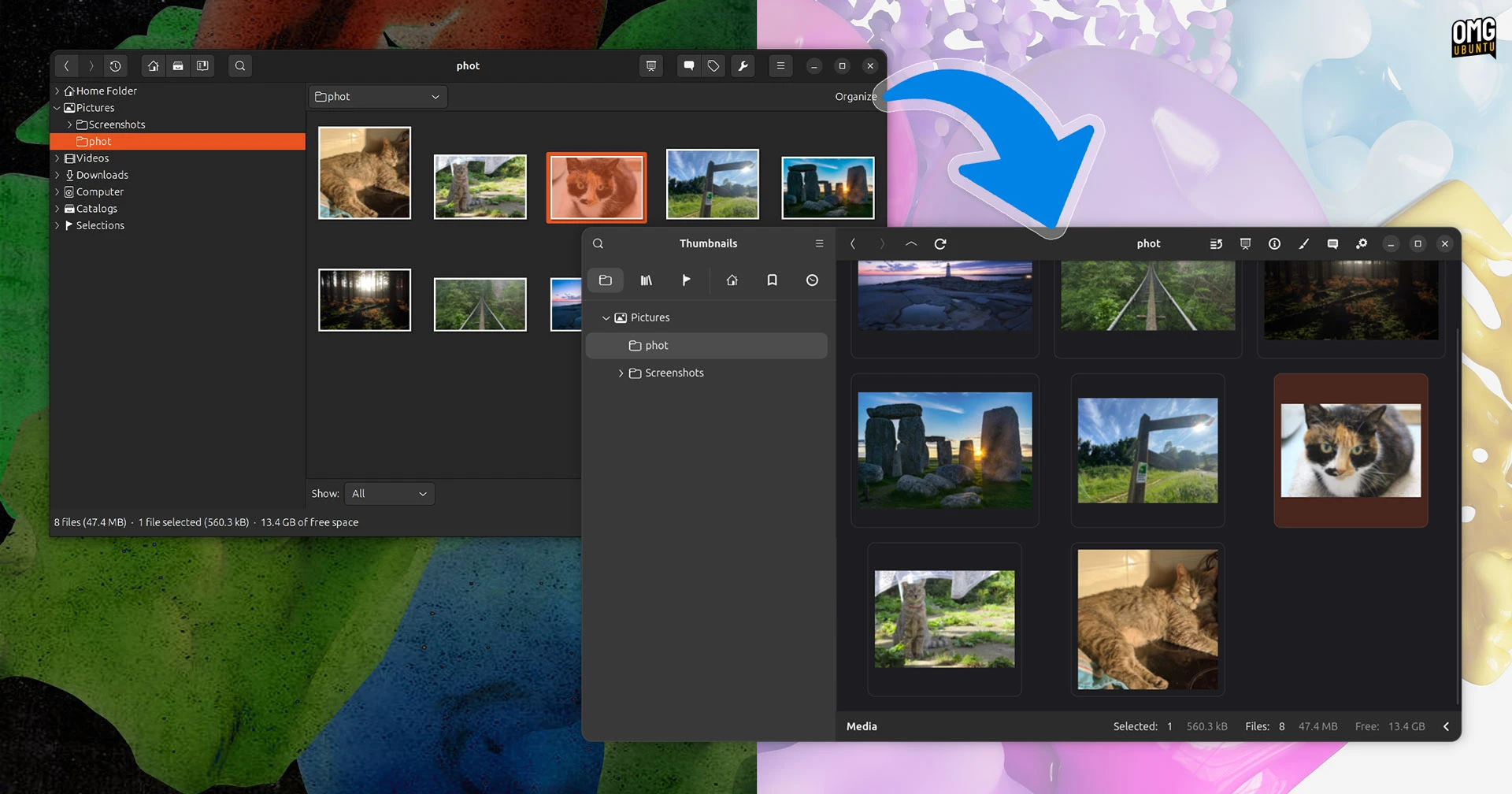
gThumb, the popular open-source image viewer and organizer, has undergone a dramatic transformation. The latest alpha release of version 4.0 introduces a complete rewrite in Vala and a full migration to GTK4 and libadwaita. The result is a user interface that is almost unrecognizable compared to its predecessor. This isn't just a minor facelift—it's a fundamental rethink of how gThumb looks and feels, promising a more modern and streamlined experience for users.

The UI Revolution: From GTK3 to GTK4 and Libadwaita
Any application transitioning from GTK3 to GTK4 gains a certain freshness, but gThumb's upgrade goes far beyond a simple port. The integration of libadwaita brings a cohesive, adaptive design language that aligns with the latest GNOME applications. The old, somewhat dated interface has been replaced with cleaner lines, refined spacing, and a more intuitive layout. Toolbars, sidebars, and dialogs have been redesigned to reduce clutter and improve focus on the content—the images themselves.
Key Visual Changes
- Modern Toolbar: The traditional menu bar and toolbar have been replaced with a header bar that integrates navigation, zoom controls, and view options in a more compact area.
- Adaptive Panels: Side panels for folders, tags, and metadata now use libadwaita's adaptive patterns, resizing gracefully on different screen sizes.
- Unified Color Scheme: The application follows the system-wide accent color and dark mode preferences, offering a seamless visual experience.
- Smoother Animations: Transitions between views and actions are now animated, providing a fluid feel that was absent in earlier versions.
While a GTK4 port doesn't automatically guarantee a visually stunning result, gThumb's developers have clearly put effort into refining every detail. The alpha build demonstrates a polished, ambitious direction that sets a new standard for image management on Linux.
Beyond the Surface: New Features in gThumb 4.0
Alongside the visual overhaul, gThumb 4.0 Alpha introduces several functional improvements that enhance its utility as a modern image viewer and organizer.
Expanded Format Support
One of the most requested additions has been support for modern image formats. gThumb 4.0 now handles WEBP and PNG animations natively. This means users can view animated stickers, lightweight web graphics, and high-efficiency images without needing external converters or workarounds. Additionally, the application can now export images in the JPEG XL (JXL) format, a next-generation codec that offers superior compression and quality, making it a great choice for archiving high-resolution photos.
Privacy and Editing: The Censor Filter
For those who need to share images while protecting sensitive information, gThumb 4.0 adds a dedicated censor filter. This tool allows you to pixelate or blur specific regions of an image directly within the viewer. Whether you're redacting a face, a license plate, or confidential data, the filter is simple to apply and customize. The blur and pixelation intensity can be adjusted, giving you control over the level of anonymization.
Performance and Codebase
The rewrite in Vala not only brings a more modern and maintainable codebase but also improves performance. Startup times are faster, and resource usage during operations like zooming, panning, and slideshow playback is more efficient. The transition to GTK4 also brings better hardware acceleration and input handling, which is especially noticeable on high-DPI displays.
Testing the Alpha
The alpha build of gThumb 4.0 is now available for testing. It is still a work in progress, so users may encounter bugs or incomplete features. However, for those curious about the future of gThumb, downloading the alpha is a chance to get early access and provide feedback to developers. The project is actively seeking testers to report issues and suggest improvements before the stable release.
How to Try gThumb 4.0 Alpha
- Visit the official gThumb website or its Flathub page (once the alpha is published there).
- Alternatively, compile from source using the development branch on GitLab.
- Launch the application and explore the new interface. Note that existing bookmarks and settings may not be fully compatible yet.
A Promising New Chapter
gThumb 4.0 Alpha represents the most significant update in the application's history. By embracing GTK4 and libadwaita, the developers have not only modernized the look but also laid a foundation for future enhancements. The addition of WEBP, PNG animation, JXL export, and a censor filter addresses long-standing user requests. While the design changes may be jarring for longtime users, the overall direction is clear: gThumb is evolving into a contemporary, powerful image management tool that doesn't compromise on usability or aesthetics. Test the alpha today and help shape the final release.
Related Articles
- Reviving the Spirit: 7 Fascinating Insights into the Unity Desktop's Modern Rebirth in Wayfire and Libadwaita
- 8 Critical Facts About the Quasar Linux RAT Targeting Developer Credentials
- Linux 7.2 Kernel Update: 'Fair' DRM Scheduler and AMD AIE4 Hardware Integration Coming
- Press Freedom Under Siege: The Plight of Palestinian Journalists and Media
- Exploring the Latest Features of Fedora Linux 44
- Fedora Delays Decision on x86_64-v3 Optimization for Fedora Linux 45
- Exploring the Enhanced NTFS Driver in Linux Kernel 7.1-rc2: Key Updates and Performance Gains
- 5 Key Facts About the DDoS Attack That Crippled Ubuntu Services