10 Essential Steps to Build a Natural Language Interface for Spotify Ads with Claude Code Plugins
Imagine being able to manage your Spotify ad campaigns through simple plain‑English commands — no complex code or API calls to memorize. Thanks to Claude Code Plugins and the Spotify Ads API, this is now possible. By converting OpenAPI specifications and Markdown documentation into a conversational interface, you can create a powerful ads management tool without compiling a single line of code. Here are ten things you need to know to get started.
1. Understand the Power of Natural Language Interfaces
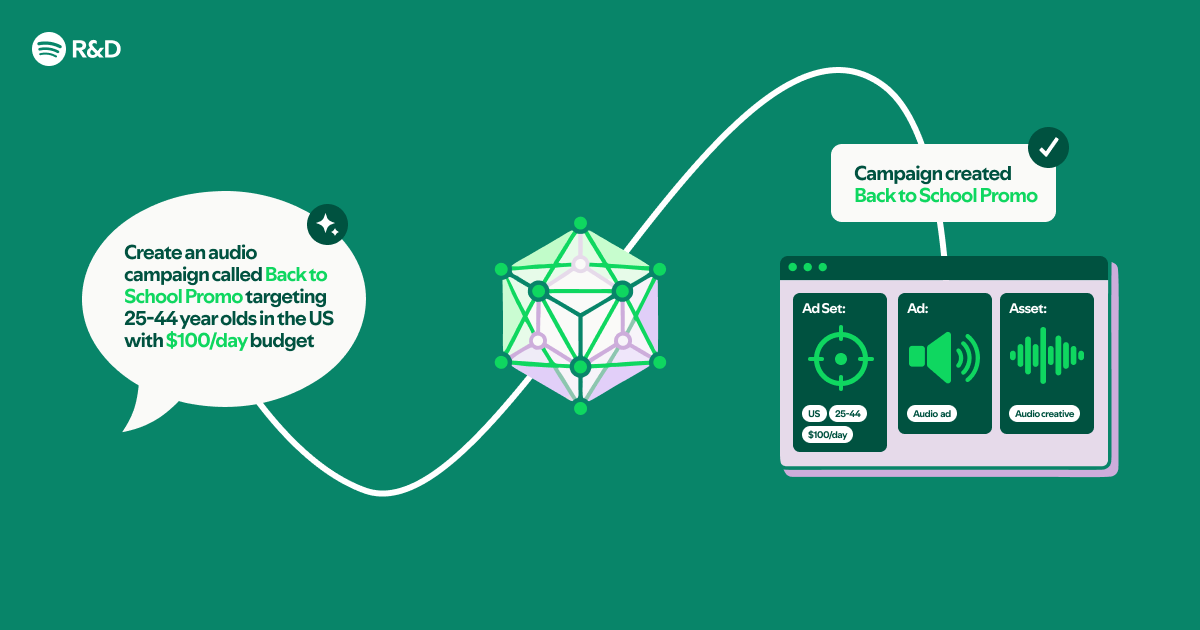
A natural language interface (NLI) lets users interact with software using everyday language. For the Spotify Ads API, this means you can ask things like “Show me last week’s campaign performance” or “Pause my ad set for the US region” instead of remembering exact endpoint names and parameters. Claude Code Plugins act as the bridge, interpreting your words and translating them into API calls. This approach dramatically reduces the learning curve for marketing teams and makes ad management faster and more intuitive.
2. Start with the OpenAPI Specification
The Spotify Ads API follows the OpenAPI standard, which provides a machine‑readable description of all available endpoints, request structures, and responses. This specification becomes the backbone of your NLI. Claude Code Plugins can parse it to understand what actions are possible (e.g., retrieving campaigns, creating ads) and what data each operation requires. Having a complete, up‑to‑date OpenAPI file is critical — without it, the plugin won’t know which endpoints exist or how to call them correctly.
3. Leverage Markdown Documentation for Context
Beyond the technical spec, Spotify provides human‑friendly Markdown documentation that explains business concepts, best practices, and usage examples. Feeding these Markdown files into your Claude Code Plugin enriches its understanding of the domain. For instance, it learns that “impressions” are the number of times an ad is displayed, and “spend cap” limits daily budget. This contextual knowledge makes the plugin smarter about answering nuanced questions and providing accurate recommendations.
4. Set Up Claude Code Plugins Correctly
Claude Code Plugins are designed to work with custom data sources. You need to install the plugin framework and configure it to read your OpenAPI spec and Markdown files. The setup involves pointing the plugin to the local paths or URLs where these files live. No compiled code is required — everything is done through configuration files and plain text inputs. Once configured, Claude will automatically index the information and use it to formulate API calls based on natural language queries.
5. Map Natural Language Intents to API Endpoints
The core of your NLI is intent mapping. Claude Code Plugins analyze user input and match it to the most relevant API endpoint. For example, “What were our top ads yesterday?” should trigger a GET request to the /ads/analytics endpoint with appropriate date filters. The plugin uses the OpenAPI spec to understand endpoint parameters and the Markdown docs to resolve ambiguous terms (e.g., “yesterday” becomes a specific date range). This mapping must be thorough to handle varied phrasings.
6. Handle Authentication Seamlessly
The Spotify Ads API requires OAuth 2.0 authentication. Your natural language interface must manage tokens securely without asking the user to paste credentials repeatedly. Claude Code Plugins can be configured to store and refresh tokens, or you can integrate them with an existing auth flow. The goal is to make the process invisible — the user simply grants permission once, and the plugin handles the rest. For security, never hardcode secrets in your configuration; use environment variables or a secrets manager.

7. Test with Real‐World Query Examples
After setting up the plugin, thoroughly test it with queries that mimic actual advertiser use cases. Try commands like “Increase my campaign budget by 20%,” “Show me all ad sets with high CTR,” or “What was the cost per conversion last month?” Observe how the plugin interprets each request and whether it selects the correct endpoint. If responses are off, you may need to refine the Markdown documentation or add explicit mappings in the plugin configuration.
8. Refine Prompts and Contextual Understanding
Claude Code Plugins rely on the quality of your input data. If the plugin misunderstands terms or returns wrong data, revisit your OpenAPI spec and Markdown files. Add more examples, clarify ambiguous endpoints, and improve descriptions. You can also adjust the plugin’s “system prompt” to set behavior — for instance, instructing it to always confirm before making changes. This iterative process ensures the tool becomes more accurate and trustworthy over time.
9. Deploy Without Compiling Code
One of the biggest advantages of using Claude Code Plugins is that you never need to write or compile code. The entire interface runs on configuration files, markdown, and API specs — pure text. This means you can deploy updates by simply editing documentation files or endpoint descriptions. For teams without dedicated developers, this is a huge win. You can even version‑control your configs and roll back changes easily. Deployment is as simple as restarting the plugin or pushing new files.
10. Monitor and Iterate for Continuous Improvement
After launch, monitor how users interact with your natural language interface. Track what queries succeed, which ones fail, and where users get stuck. Use this feedback to update your Markdown docs or add new endpoints to the OpenAPI spec as the Spotify Ads API evolves. Since everything is built on text files, improvements are quick to implement. Over time, your tool will become a trusted assistant for advertisers, making campaign management faster and more accessible than ever.
Conclusion: Building a natural language interface to the Spotify Ads API with Claude Code Plugins is a straightforward, code‑free process that democratizes ad management. By combining OpenAPI specifications, Markdown documentation, and the power of Claude, you can create a conversational tool that understands your business needs. Whether you’re a marketer, a product manager, or a developer looking to prototype quickly, this approach lets you focus on what matters — getting insights and optimizing campaigns without wrestling with APIs. Start with the steps above and turn your Spotify Ads workflows into a simple conversation.
Related Articles
- How to Spot Quiet Changes in Your Password Manager: A Bitwarden Case Study
- Joining the Python Security Response Team: Governance, Onboarding, and Impact
- New Wave of Supply Chain Attacks Targets CI/CD Infrastructure – Experts Warn
- The Art of Self-Debugging: From Rubber Ducks to Stack Overflow
- Supply Chain Attacks Now Target Developer Secrets: Three Major Campaigns in 48 Hours
- Pyroscope 2.0 Launches: Ground-Up Redesign Makes Continuous Profiling Cheaper and Faster at Scale
- Python Community Establishes Packaging Council as 3.15 Nears Beta
- Migrating to the Latest A2UI and Flutter GenUI: A Step-by-Step Guide